

Voice over LTE (VoLTE)
Frequently Asked Questions
Voice over LTE (VoLTE)
What is VOLTE?
VoLTE (Voice over LTE) allows voice calls to be made over the LTE network, providing higher quality and faster call setup times compared to traditional methods.
What are the benefits of VoLTE?
There are several benefits to VoLTE. These include:
- The ability to use Voice and Data at the same time
- Improved battery efficiency
- High-definition voice quality
- Faster call setup times – VoLTE calls connect faster
- Seamless connectivity when you travel to markets with 4G LTE Markets
How can I get VoLTE?
You will need the following to access VoLTE:
- 4G Capable SIM
- VoLTE capable mobile device
- You must have a bmobile Data Plan
Check your compatibility by visiting bmobile.co.tt/VOLTE for information on how to add the settings on your device.
Once you have all three above and have setup your device you can call us at 824-TSTT (8788) or visit any bmobile store to activate the service.
What should I do if I don’t meet the criteria for VoLTE as described above?
Visit any bmobile store for information on how you can experience VoLTE.
Is there any cost associated with adding VoLTE to my service?
VoLTE is FREE to all bmobile customers. Experience all the benefits at no additional cost.
Which customers can get VoLTE service?
Any Prepaid or Postpaid mobile customer can get the VoLTE Service activated.
Additional Terms and Conditions
- This service is provided for individual personal use only. It is not for commercial purposes or use by groups. Any use, in bmobile’s sole discretion, by an individual or groups for financial gain or profit will cause the immediate termination of access to and/or use of this service.
- bmobile may temporarily or permanently alter or withdraw this service as offered to our customers.
- bmobile reserves the right to change or cancel the terms & conditions of this service with notice at any time. Notice to customers via text messages to customers’ handsets/devices or via posting on the bmobile website will be deemed sufficient. Any such notice will be effective immediately or as of the date referred to in the said notice.
- Subject to the above, the standard Postpaid & Prepaid Mobile Terms and Conditions of service apply.
Are you VoLTE ready?
Enter your number below to get started.
You are VoLTE ready!
Let's setup your device.
You need additional support to get set up.
Visit a Store
Visit your nearest dealer store for in-person assistance with VoLTE setup
Sorry, we're not currently supporting other phones
Please consult your phone manual to apply APN settings
- Your APN
iPhone · Step 1 of 4
Ensure your iPhone is up to date
It should say iOS is up to date
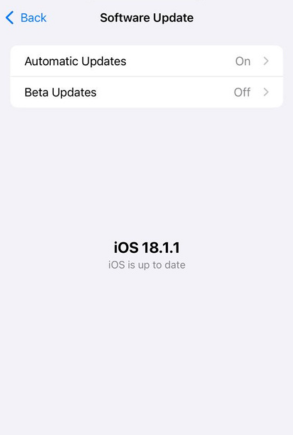
- Ensure your iPhone is up to date
-
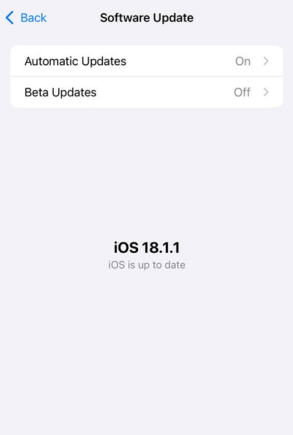
Ensure your iPhone is up to date
iPhone · Step 2 of 4
Set up your iPhone for VoLTE
iPhone 7 and higher with iOS 15 or later
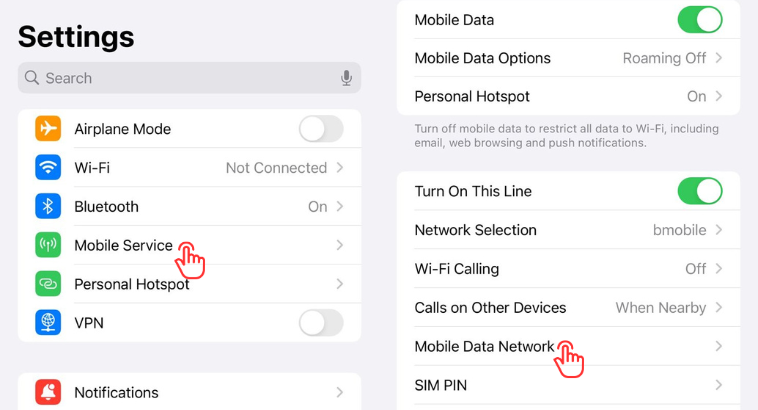
- Go to Settings, Tap Mobile Service/Cellular
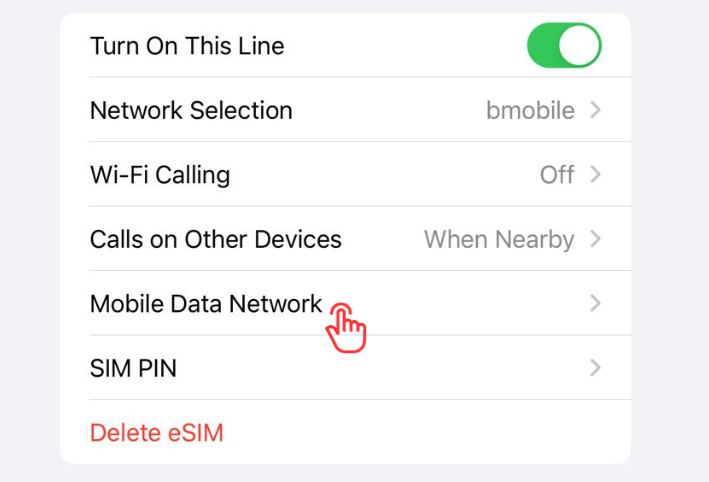
- Tap Mobile/Cellular Data Network
-
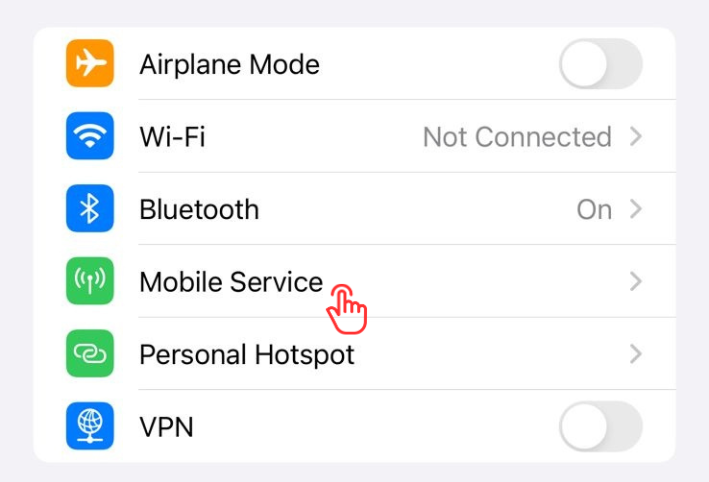
Go to Settings > Tap Mobile Service/Cellular
-
Tap Mobile/Cellular Data Network
iPhone · Step 3 of 4
Configure the APN on your iPhone
Set up your APN
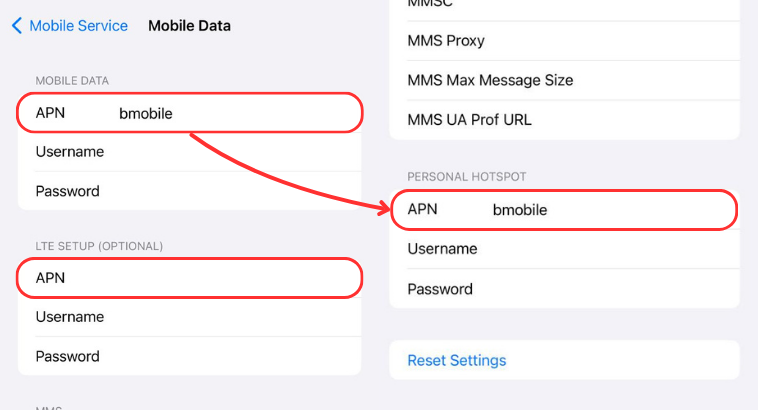
- Set MOBILE DATA APN = bmobile
- Set LTE SETUP (optional) = empty
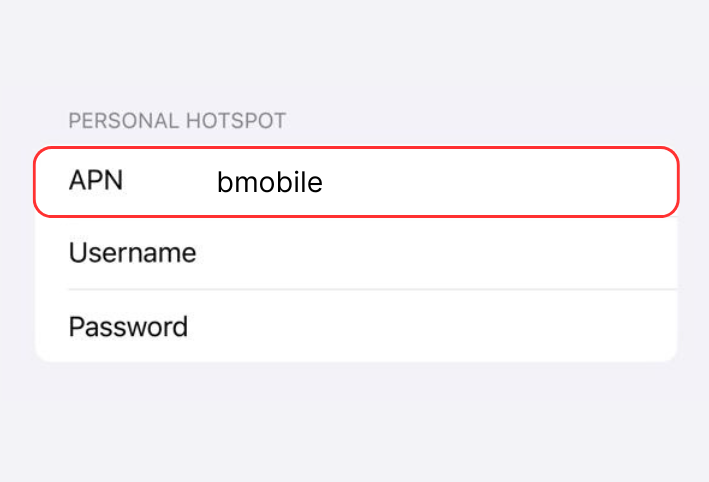
- Set PERSONAL HOTSPOT APN = bmobile
-
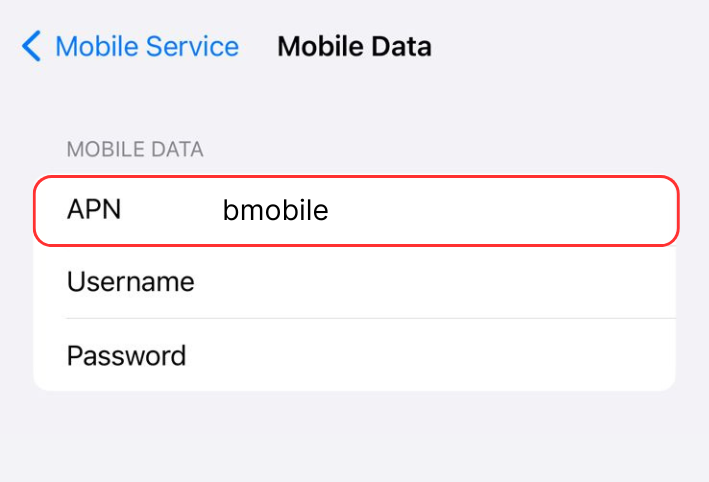
Set MOBILE DATA APN = bmobile
-
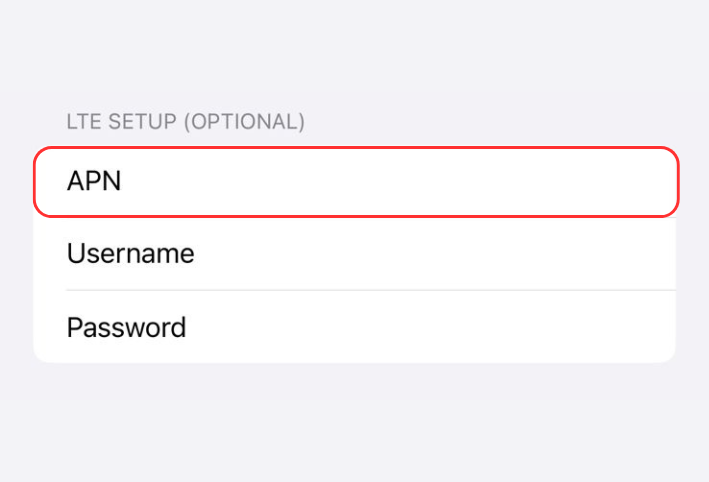
Set LTE SETUP (optional) = empty
-
Set PERSONAL HOTSPOT APN = bmobile
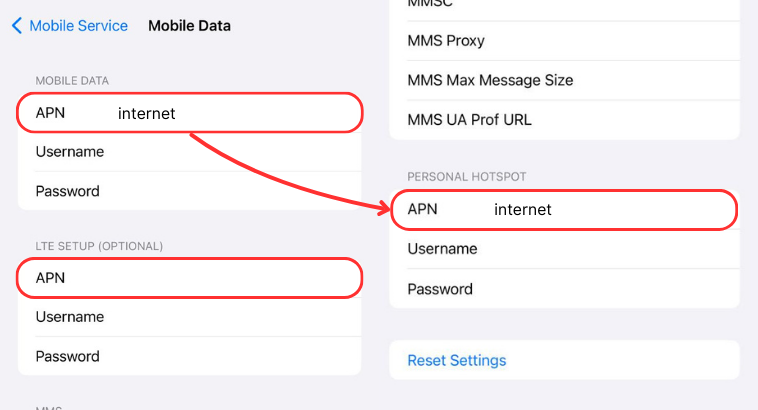
- Set MOBILE DATA APN = internet
- Set LTE SETUP (optional) = empty
- Set PERSONAL HOTSPOT APN = internet
-
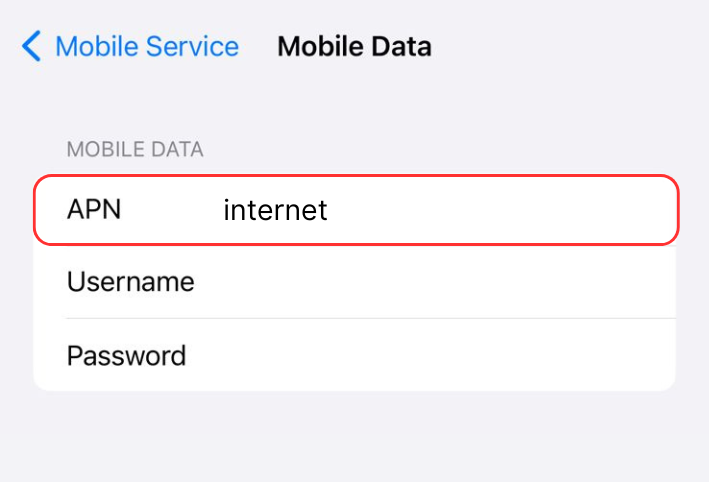
Set MOBILE DATA APN = internet
-
Set LTE SETUP (optional) = empty
-
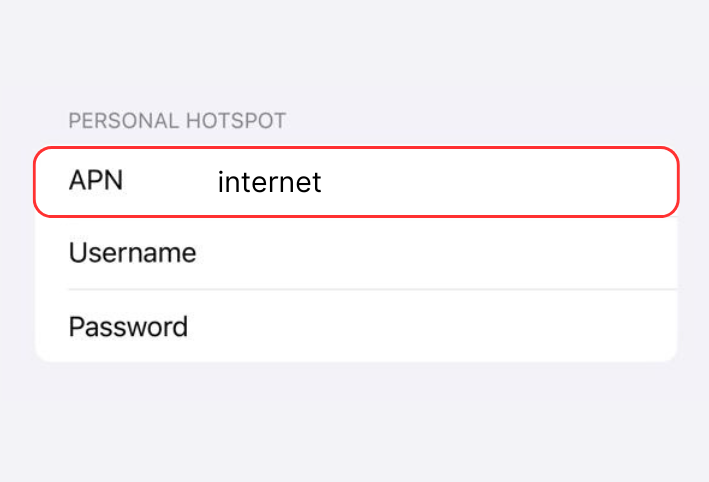
Set PERSONAL HOTSPOT APN = internet
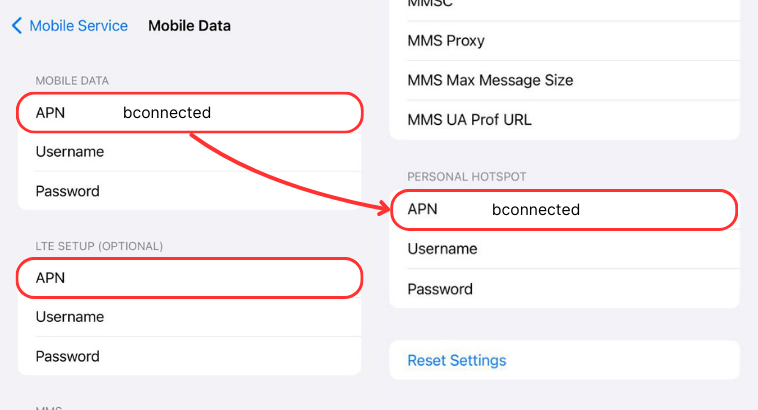
- Set MOBILE DATA APN = bconnected
- Set LTE SETUP (optional) = empty
- Set PERSONAL HOTSPOT APN = bconnected
-
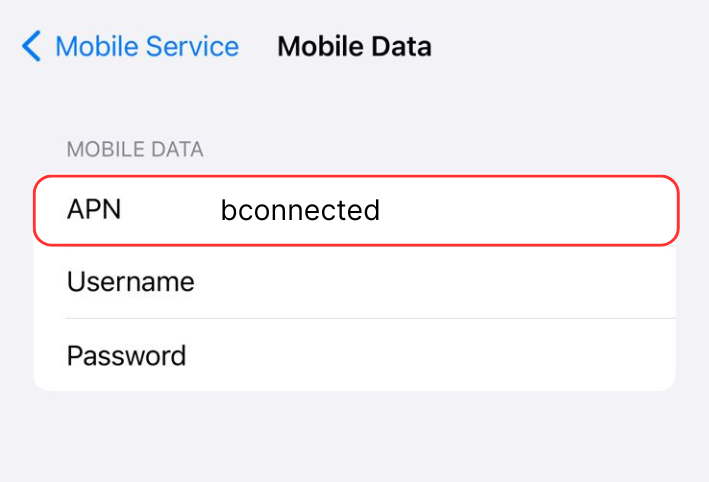
Set MOBILE DATA APN = bconnected
-
Set LTE SETUP (optional) = empty
-
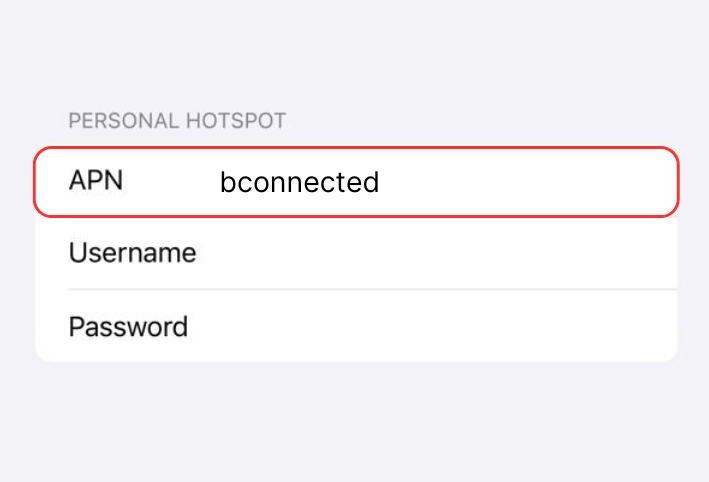
Set PERSONAL HOTSPOT APN = bconnected
iPhone · Step 4 of 4
Ensure VoLTE is enabled
iPhone 7 and higher with iOS 15 or later
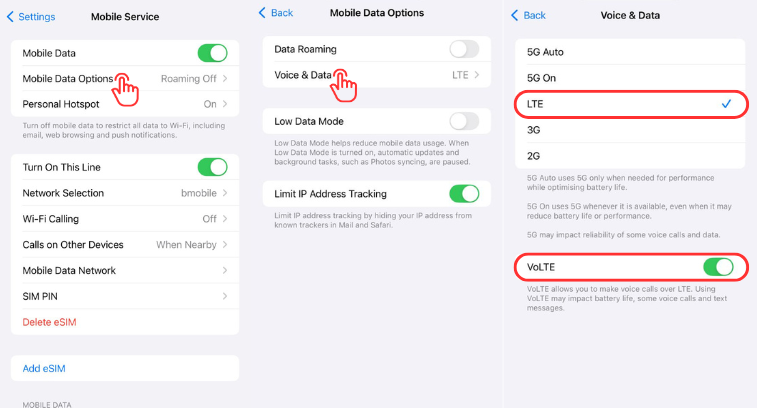
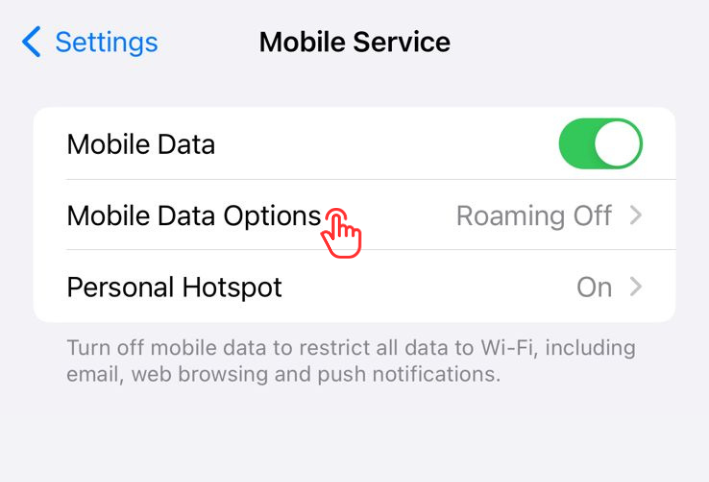
- In Mobile Service/Cellular, Tap Mobile Data Options
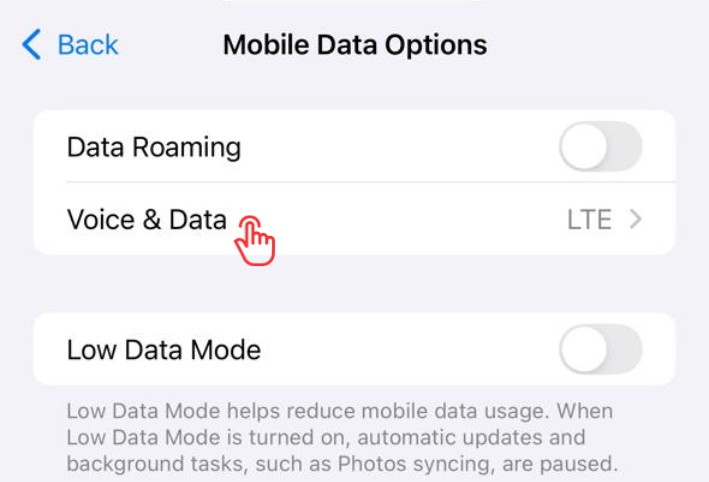
- Tap Voice & Data
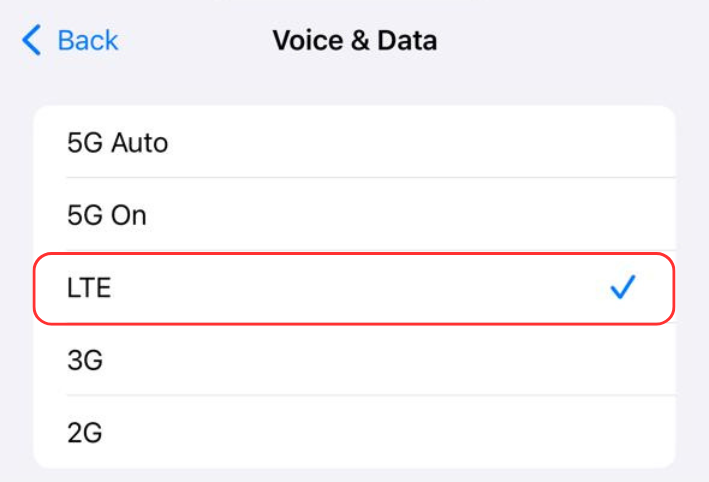
- Ensure LTE is checked
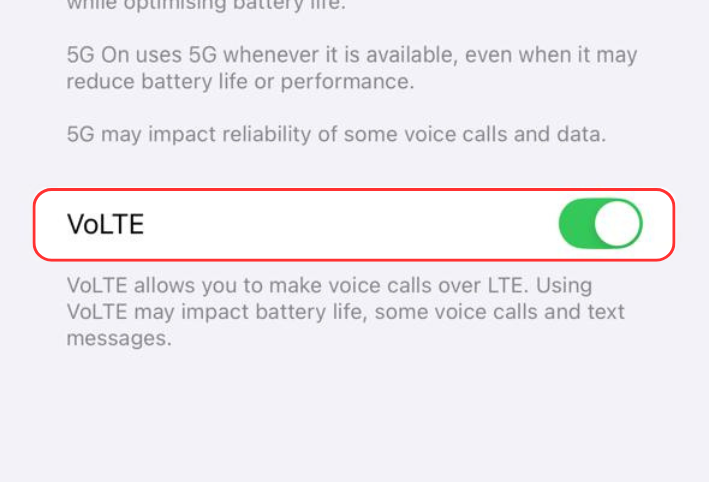
- Ensure VoLTE is enabled
-
In Mobile Service/Cellular, Tap Mobile Data Options
-
Tap Voice & Data
-
Ensure LTE is selected
-
Ensure VoLTE is toggled on
Samsung · Step 1 of 4
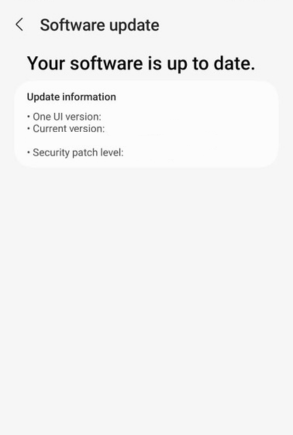
Ensure your phone has the latest software update
It should say that your software is up to date
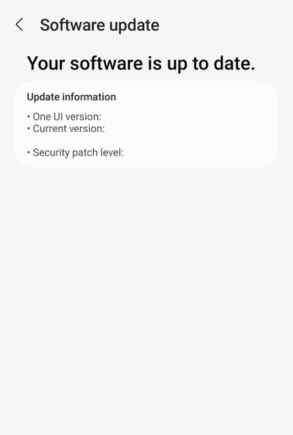
- Ensure your phone is up to date
-
Ensure your software is up to date
Samsung · Step 2 of 4
Set up your phone for VoLTE
Updated Samsung software
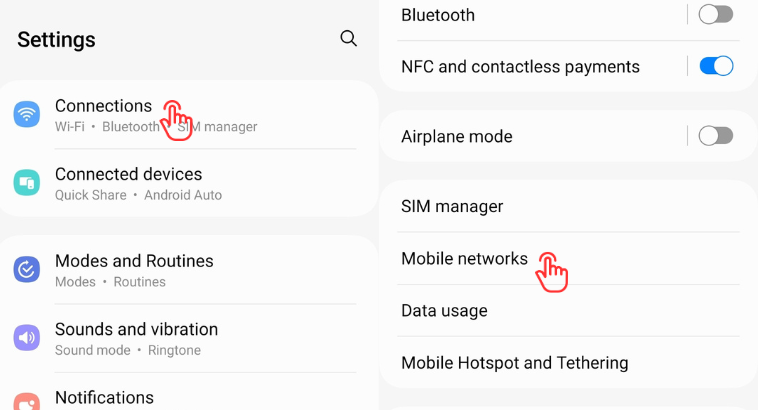
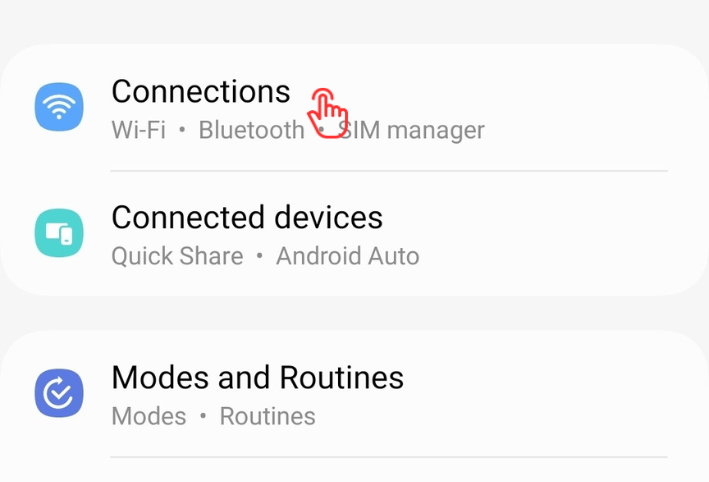
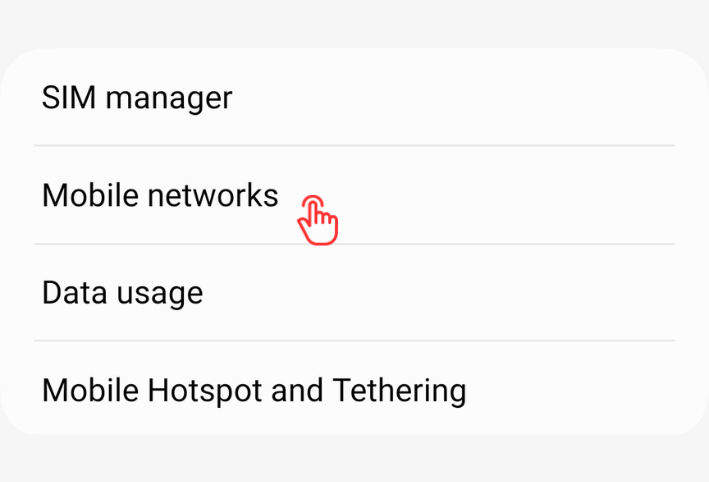
- Go to Settings & Tap Connections
- Tap Mobile Networks
-
Go to Settings > Tap Connections
-
Tap Mobile networks
Samsung · Step 3 of 4
Configure the APN on your phone
Set up your APN
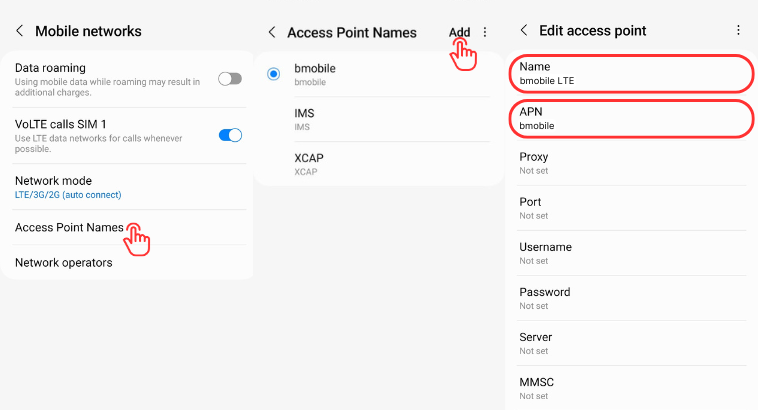
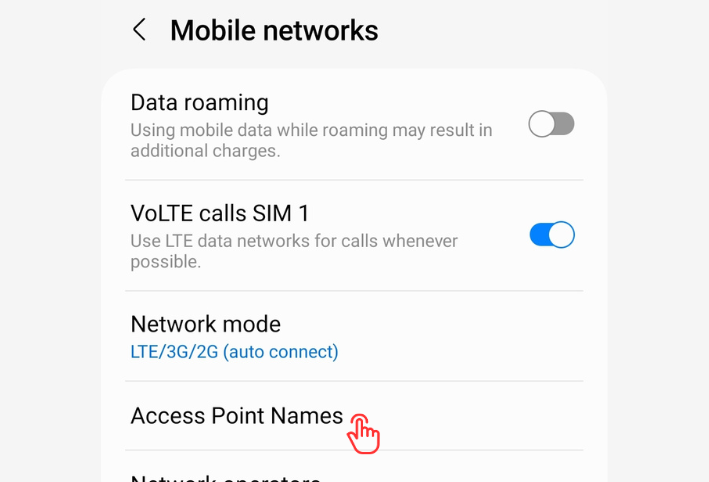
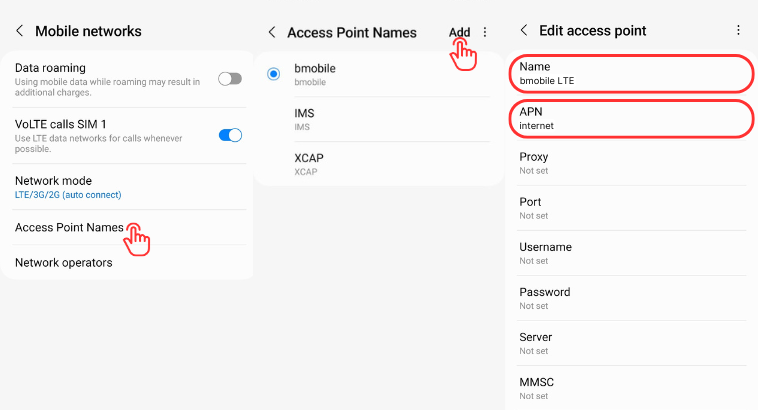
- Tap on Access Point Names
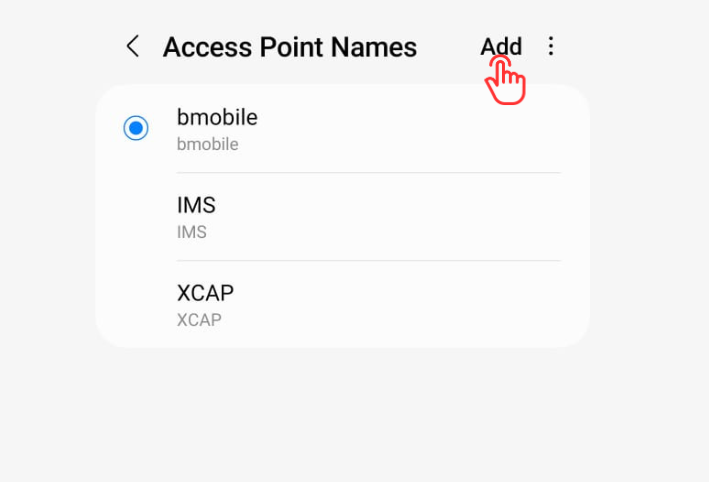
- Tap Add on top right corner
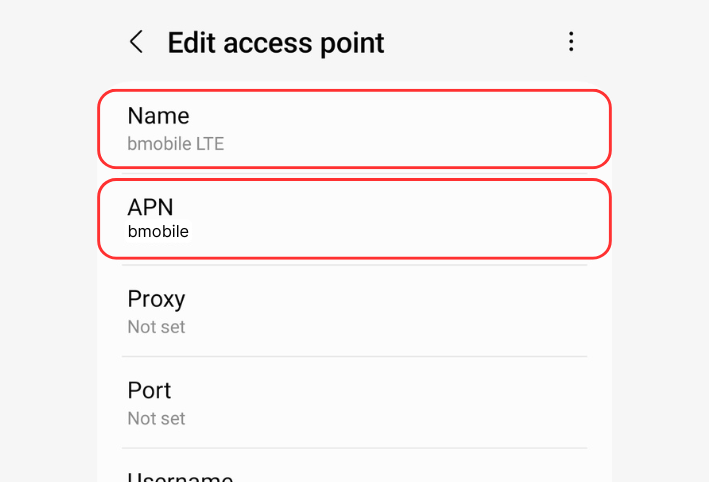
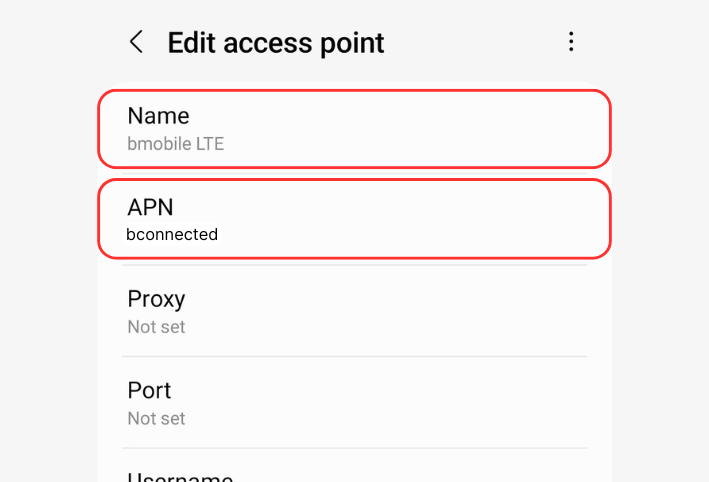
- Set Name = bmobile LTE & APN = bmobile
-
Tap on Access Point Names
-
Tap Add on top right corner
-
Set Name = 'bmobile LTE' LTE & APN = bmobile
- Tap on Access Point Names
- Tap Add on top right corner
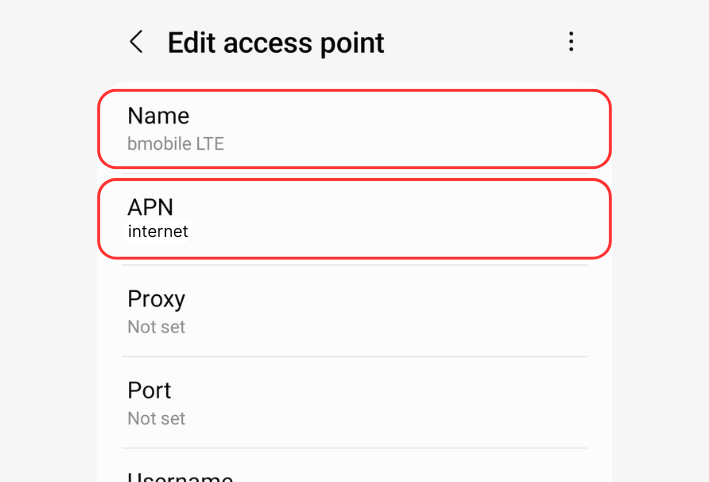
- Set Name = internet LTE & APN = internet
-
Tap on Access Point Names
-
Tap Add on top right corner
-
Set Name = 'bmobile LTE' & APN = internet
- Tap on Access Point Names
- Tap Add on top right corner
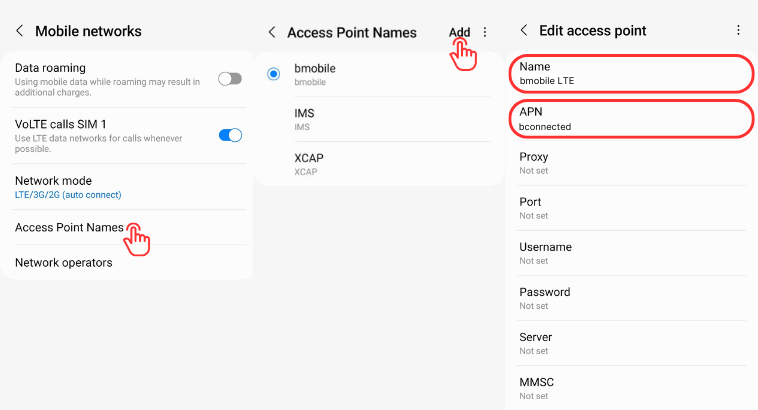
- Set Name = bconnected LTE & APN = bconnected
-
Tap on Access Point Names
-
Tap Add on top right corner
-
Set Name = 'bmobile LTE' & APN = bconnected
Samsung · Step 4 of 4
Setup LTE and Network Mode
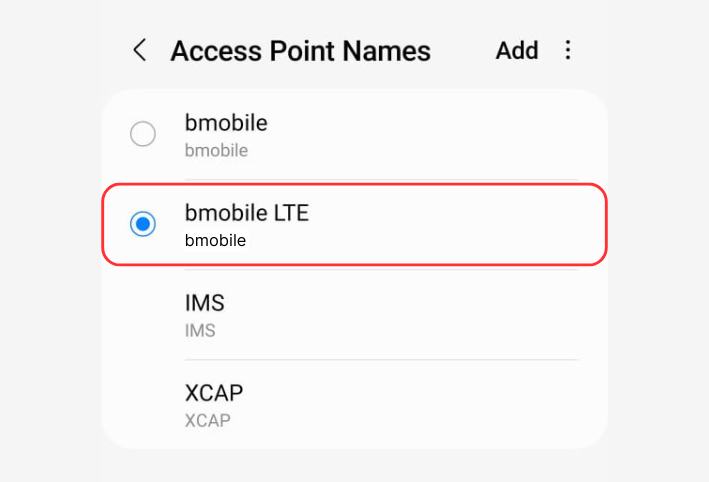
Ensure APN is selected
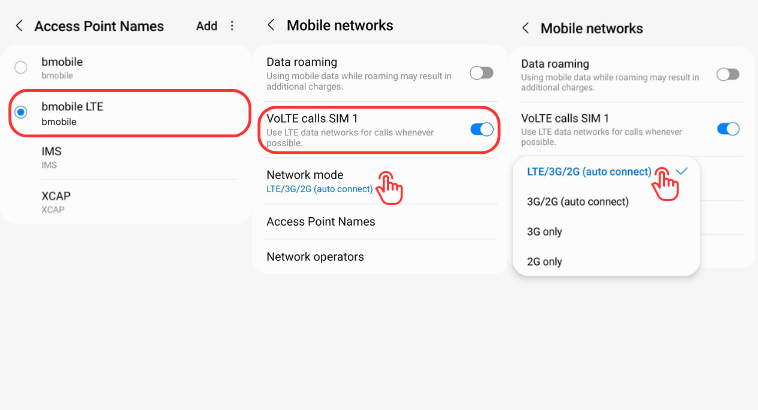
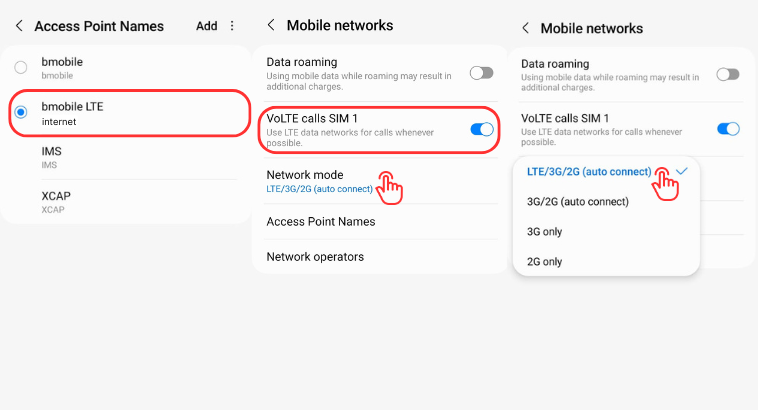
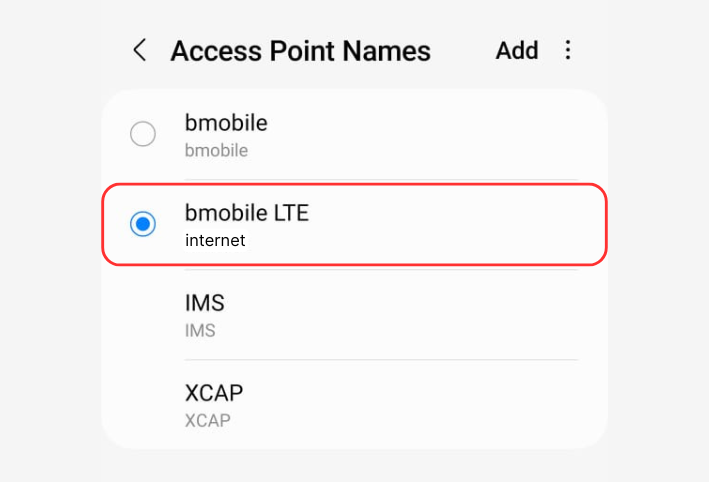
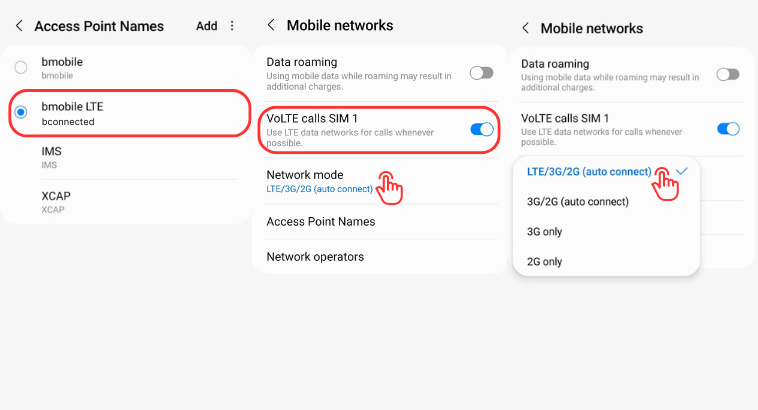
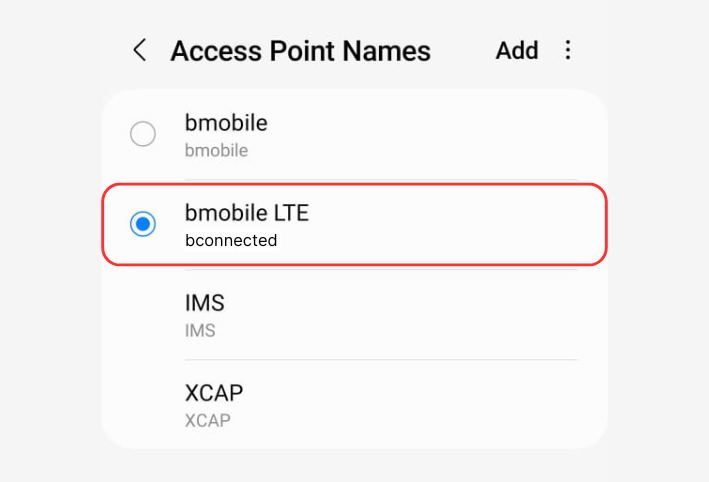
- Go back to Access Point Names and ensure the one you created is selected
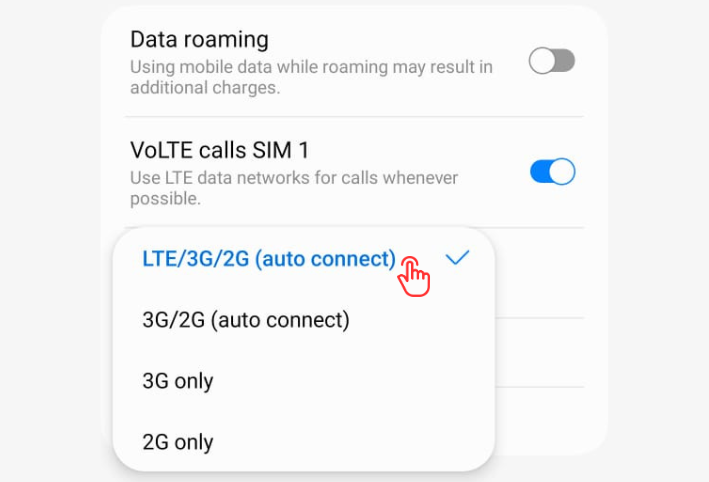
- Go back to Mobile networks, ensure VoLTE is turned on
- Ensure Network Mode is set to LTE/3G/2G (auto connect)
-
Go back to Access Point Names and ensure the one you created is selected
-
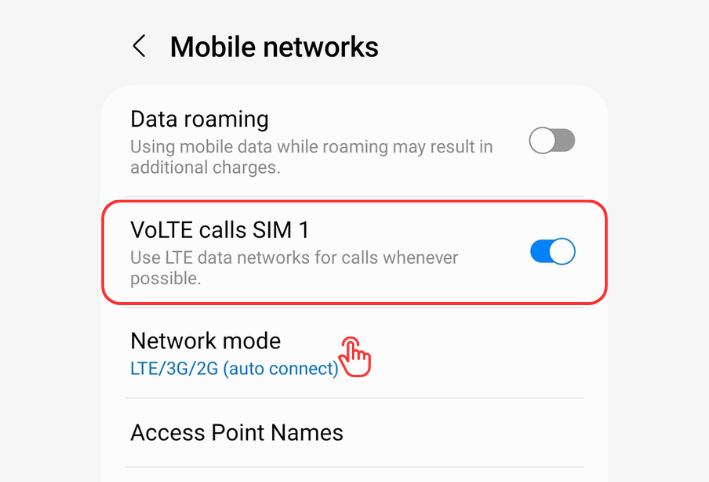
Go back to Mobile networks, ensure VoLTE is turned on
-
Ensure Network Mode is set to LTE/3G/2G (auto connect)
- Go back to Access Point Names and ensure the one you created is selected
- Go back to Mobile networks, ensure VoLTE is turned on
- Ensure Network Mode is set to LTE/3G/2G (auto connect)
-
Go back to Access Point Names and ensure the one you created is selected
-
Go back to Mobile networks, ensure VoLTE is turned on
-
Ensure Network Mode is set to LTE/3G/2G (auto connect)
- Go back to Access Point Names and ensure the one you created is selected
- Go back to Mobile networks, ensure VoLTE is turned on
- Ensure Network Mode is set to LTE/3G/2G (auto connect)
-
Go back to Access Point Names and ensure the one you created is selected
-
Go back to Mobile networks, ensure VoLTE is turned on
-
Ensure Network Mode is set to LTE/3G/2G (auto connect)
Note: If you do not see these options your device may not be VoLTE Capable. Visit us in store to check your settings.
Setup Complete!
Your device is now configured for VoLTE.